Scripts
Scripts are shell commands that Pie executes during test runs. They let your tests interact with backend systems - fetching test data, creating users, generating OTPs, or calling any API your tests need. You reference scripts in test steps using the #{script-name} syntax, and Pie’s AI agent decides when to execute them during the test flow.
How Scripts Work
The Execution Flow
- You create a script with a name and a shell command (typically a curl command)
- You reference it in a test case using
#{script-name}in your test steps or prompt - During test execution, Pie’s AI agent detects the script reference and runs the command
- The output is captured (stdout) and made available to subsequent test steps
- The AI agent uses the output - for example, entering a generated phone number into a form field
Scripts have a 5-minute timeout. If a script doesn’t complete within 5 minutes, execution continues and the failure is logged.
What Makes This Powerful
Pie’s AI agent doesn’t just blindly run scripts at a fixed point. It understands the test context and decides when to execute each script based on what the test needs. If your test says “sign up with a unique phone number from #{get-unique-phone}”, the agent will:
- Execute the script when it reaches the phone number input field
- Read the script’s output (the generated phone number)
- Enter that value into the field
- Continue with the rest of the test
This means scripts integrate naturally into test flows without rigid step ordering.
Creating Scripts
From the Dashboard
- Log in to app.pie.inc
- Navigate to Settings > Scripts
- Click + Add
- Enter a Script Name (this becomes the
#{name}reference) - Enter the curl command or shell command
- Click Save
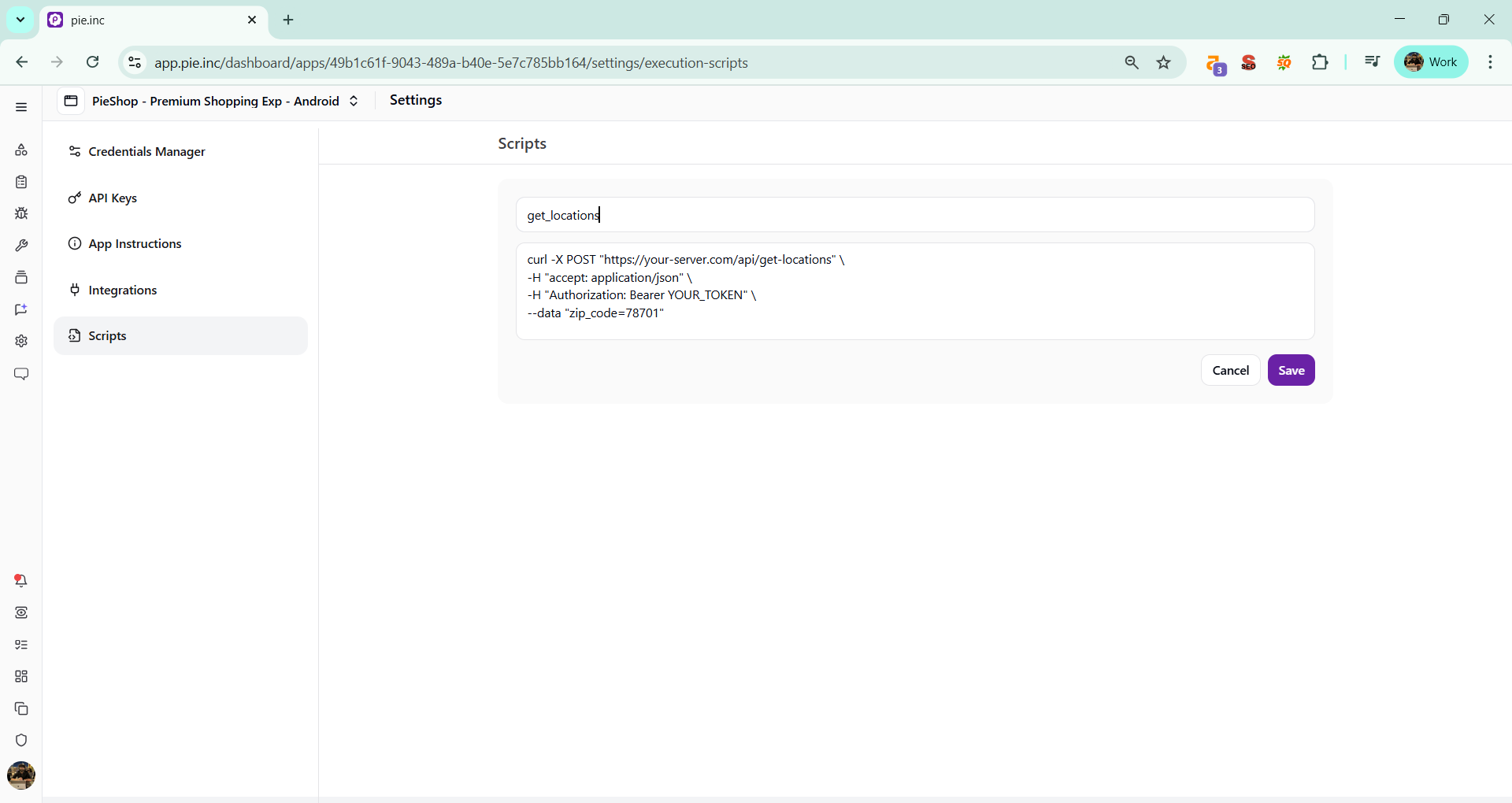
From Your AI Workspace (MCP)
Create a script called "get-unique-phone" that runs:
curl -X GET "https://api.example.com/test-phone" -H "Authorization: Bearer TOKEN"
Script Command Format
Scripts are shell commands executed on Pie’s infrastructure. The most common format is a curl command:
curl -X POST "https://your-staging-api.com/api/create-test-user" \
  -H "Content-Type: application/json" \
  -H "Authorization: Bearer YOUR_STAGING_TOKEN" \
  -d '{"role": "premium", "plan": "enterprise"}'
Your command should:
- Target your staging or test environment, never production
- Include proper authentication headers
- Return data in a consistent format (JSON recommended)
- Be idempotent when possible - safe to run multiple times
Referencing Scripts in Test Cases
Use the #{script-name} syntax anywhere in your test case prompt or steps.
Single Script Reference
Test prompt:
Sign up for a new account. Use #{get-unique-phone} to generate
a phone number for registration. Complete the signup flow and
verify the user lands on the dashboard.
Pie will execute the get-unique-phone script when it needs the phone number, capture the output, and use it in the signup form.
Multiple Script References
A single test case can reference multiple scripts. They execute in the order the AI agent needs them:
Test prompt:
Create a new banking user by calling #{create-new-banking-user}.
Use the returned credentials to log in. Then call #{get-valid-debit-card}
to fetch payment details and complete the card linking flow.
Chaining Script Outputs
Script outputs carry forward through the test. If your first script returns a user ID, your second script can use that value:
Test prompt:
Call #{create-test-user} to create a new user. Then call
#{generate-otp} using the phone number from the previous step.
Enter the OTP to complete verification.
Pie’s AI agent tracks all executed script outputs and passes them to subsequent steps, so values flow naturally through your test.
Common Use Cases
Generating Unique Test Data
The most common use case. Tests that create accounts need unique identifiers every run:
| Script Name | Command | Purpose |
|---|---|---|
get-unique-phone | curl https://api.example.com/test-phone | Generate a unique phone number for signup |
get-unique-email | curl https://api.example.com/test-email | Generate a unique email address |
create-test-user | curl -X POST https://api.example.com/users -d '{"type":"test"}' | Create a user and return credentials |
Bypassing Verification Steps
OTP, KYC, CAPTCHA, and other verification steps block automated testing. Scripts let you call your backend directly:
| Script Name | Command | Purpose |
|---|---|---|
generate-otp | curl https://api.example.com/test-otp?phone=... | Get the OTP from your backend instead of SMS |
bypass-kyc | curl -X POST https://api.example.com/verify-kyc -d '{"userId":"...","status":"approved"}' | Mark a user as KYC-verified |
get-captcha-solution | curl https://api.example.com/test-captcha | Get a valid CAPTCHA response for test environments |
Fetching Environment-Specific Data
Tests need data that matches your staging environment:
| Script Name | Command | Purpose |
|---|---|---|
get-valid-debit-card | curl https://api.example.com/test-cards | Fetch test payment card details |
get-store-locations | curl https://api.example.com/test-locations | Get valid store/location data |
get-prequalified-user | curl https://api.example.com/test-users?credit_score=750 | Fetch a user profile matching specific criteria |
Resetting Test State
Clean up between test runs to ensure consistent starting conditions:
| Script Name | Command | Purpose |
|---|---|---|
reset-cart | curl -X DELETE https://api.example.com/cart?user=test | Clear the shopping cart |
reset-notifications | curl -X POST https://api.example.com/clear-notifications | Clear notification state |
seed-products | curl -X POST https://api.example.com/seed-test-data | Populate product catalog for testing |
Real-World Example: Fintech Loan Application
Here’s a complete example showing how scripts solve a real testing challenge.
The problem: Testing a loan approval flow requires a user with a specific credit score, valid SSN, and pre-verified identity. You can’t create this manually every test run.
Step 1: Create the scripts
Script: create-prequalified-user
curl -X POST "https://staging-api.yourbank.com/test/create-user" \
  -H "Authorization: Bearer STAGING_TOKEN" \
  -H "Content-Type: application/json" \
  -d '{"credit_score": 750, "income": 85000, "employment": "verified"}'
Script: get-test-ssn
curl -X GET "https://staging-api.yourbank.com/test/generate-ssn" \
  -H "Authorization: Bearer STAGING_TOKEN"
Script: generate-otp
curl -X POST "https://staging-api.yourbank.com/test/generate-otp" \
  -H "Authorization: Bearer STAGING_TOKEN" \
  -H "Content-Type: application/json" \
  -d '{"phone": "{{use the phone number from create-prequalified-user}}"}'
Step 2: Create the test case
Test the loan application flow end-to-end:
1. Call #{create-prequalified-user} to create a test user with good credit
2. Log in with the returned credentials
3. Navigate to "Apply for Loan"
4. Enter the SSN from #{get-test-ssn}
5. When prompted for OTP, call #{generate-otp} and enter the code
6. Complete the loan application form
7. Verify the loan is pre-approved with an offer displayed
What happens during execution:
- Pie calls
create-prequalified-user, gets back{"phone": "5551234567", "password": "TestPass1"} - Pie logs in with those credentials
- When it hits the SSN field, it calls
get-test-ssn, gets{"ssn": "123-45-6789"} - When OTP is needed, it calls
generate-otpwith the phone number from step 1 - The test completes the flow and verifies the loan offer
Naming Conventions
Use clear, verb-first names that describe what the script does:
| Good | Avoid |
|---|---|
create-banking-user | script1 |
fetch-unique-phone | phone |
get-valid-debit-card | card-data |
generate-otp | otp |
reset-cart | cleanup |
Use lowercase letters and hyphens. The name becomes the #{name} reference, so make it readable in context: “Call #{create-banking-user}” reads better than “Call #{script1}”.
Best Practices
- Target staging, never production. Scripts run on every test execution. Make sure your commands hit test environments only.
- Include authentication. Most APIs require tokens or keys. Include them in the curl command.
- Return JSON. Pie’s AI agent parses script output best when it’s structured JSON.
- Keep scripts focused. One script should do one thing. Chain multiple scripts rather than building a single complex one.
- Test manually first. Run your curl command in a terminal to verify it works before adding it to Pie.
- Use descriptive references.
#{create-prequalified-loan-user}is clearer than#{user-script}when reading test steps. - Handle errors in your API. Return meaningful error messages so Pie can report what went wrong.
Troubleshooting
Script Not Executing
- Verify the script name in your test matches exactly (case-sensitive)
- Confirm the curl command is properly formatted (test it manually)
- Check that your server endpoint is accessible from Pie’s infrastructure
Authentication Errors
- Verify your API token is current and not expired
- Check the Authorization header format
- Ensure your test server accepts requests from external IPs
Script Output Not Used
- Confirm your API returns data (not an empty response)
- Check that the response format is parseable (JSON recommended)
- If chaining scripts, verify the earlier script completed successfully
Timeout Issues
Scripts time out after 5 minutes. If your script needs more time:
- Optimize the underlying API call
- Break long operations into smaller scripts
- Consider making the API endpoint asynchronous with a polling pattern
Related Features
- Script Parameterization: Pass dynamic values between scripts using
{{placeholder}}syntax - Credentials Manager: Store login credentials separately from scripts
- Custom Test Cases: Create test cases that reference scripts