Build a complete preview environment
Give each open pull request one stable preview URL that runs the changed code with every service it needs. Pie tests a web pull request on its preview, so a frontend preview wired to an unrelated or incompatible backend isn’t ready. Your platform team usually sets this up once. After that, each Pie run starts from a known build at a known commit.
Here is what a complete preview holds.
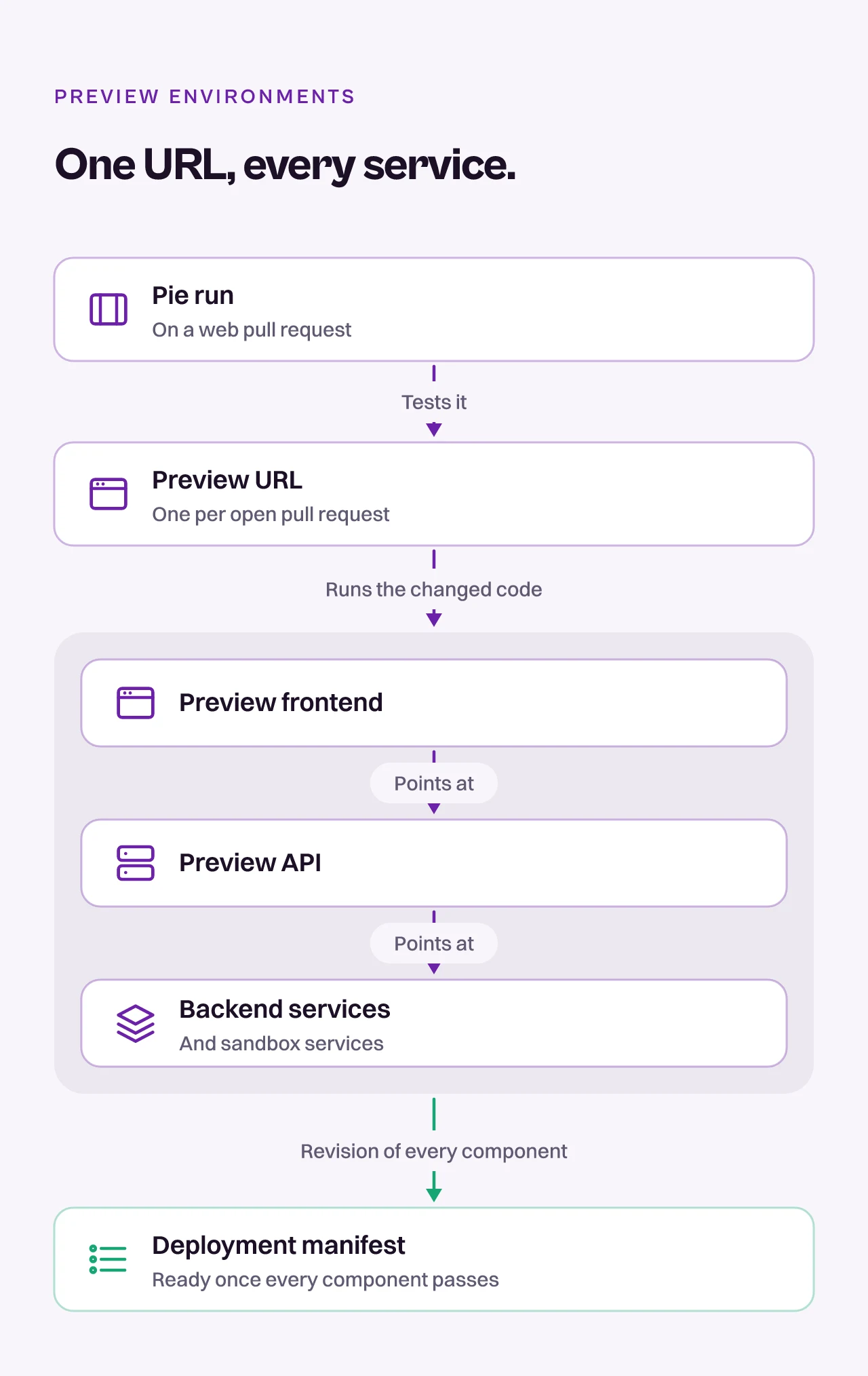
For the rest of the setup, see Test PRs.
Before you start
- Give each open PR a stable preview URL
- Know the exact commit SHA deployed to that URL
- List the runtime dependencies for the changed feature
- Add a health check for the frontend and each required service
- Set a teardown or retention policy
Deploy the whole change together
The preview needs every revision the changed path touches.
- Identify the affected services. Trace the changed user path from the browser or app through APIs, workers, databases, queues, and third-party sandboxes.
- Deploy compatible revisions together. If a frontend PR depends on a backend change, deploy both revisions into the same preview. For changes across repositories, use one shared preview identifier such as the branch name or PR number.
- Route dependencies explicitly. Point the preview frontend at the preview API. Point the preview API at the matching workers and sandbox services. Don’t rely on a developer’s local configuration.
- Publish readiness. Expose a small health endpoint or deployment status that reports the deployed SHA and the readiness of required services.
- Keep the URL stable. A new commit can replace the deployment behind the URL, but the URL itself should stay the same for the life of the PR. Pie finds it in an
@pie-pr-bot test <url>comment, a deploy bot’s comment on the PR, or a fixed pattern Pie sets up for your app.
Publish a deployment manifest
Give the preview one identifier and record the exact revision of every component:
{
  "deploymentGroup": "pr-123",
  "frontend": {
    "sha": "<FRONTEND_SHA>",
    "url": "https://pr-123.preview.example.com"
  },
  "services": [
    {
      "name": "api",
      "sha": "<API_SHA>",
      "health": "https://api-pr-123.preview.example.com/health"
    }
  ],
  "dataProfile": "order-ready-for-refund",
  "flags": {"refund-workflow": true},
  "ready": false
}
Set ready to true only after every component reports the expected SHA and passes its health check. Leave out secrets and internal connection strings.
Handle your architecture
Four setups come up often:
Changes across repositories. Use the same preview key in each repository. Resolve the related revisions through linked PRs, a committed deployment manifest, or a merge queue. Don’t guess relationships from branch names alone.
A common pattern: deploy the frontend and backend previews together from matching branch names, and point the frontend at the matching backend revision. Pie then tests the UI change and the API change it depends on as one system.
Monorepos. Build only the affected services, but publish one manifest that records every deployed component and commit SHA.
Shared services. Use an isolated namespace, tenant, or database schema when the feature writes data. If isolation is not possible, use unique test identifiers and a cleanup job.
Third-party dependencies. Use supported sandboxes for payments, email, identity and messaging. Make sure callbacks return to the preview host, not production.
What you’ll see
Before Pie runs, check that:
- The preview reports the expected commit SHA.
- The login and changed user path load without local overrides.
- Browser requests don’t call production endpoints unexpectedly.
- Required workers and callbacks complete.
- A fresh test account can repeat the path after a data reset.
For a write path, do one action through the frontend and confirm the result in the preview backend. Repeat after a fresh deployment. This catches previews that look healthy but still send writes to the wrong service.
Troubleshooting
- If the page loads but the feature fails, check API base URLs, service revisions, CORS, and callback URLs.
- If the preview works for a developer only, remove local DNS, VPN, cookie, and environment-variable dependencies.
- If the feature appears intermittently, verify feature flags, deployment readiness, and cache invalidation.
- If old code appears during a run, record the deployed SHA in the page or health response, and hold testing until it matches the PR head.
Still blocked? Contact support@pie.inc.